
Overview
The ShiftForce API gives your team read-only, programmatic access to your locations, daily logs, and stats, so you can feed them into BI dashboards, AI tools, or your own reporting instead of exporting CSVs. Access is controlled by a single API key per company, scoped to one of your admin users, with rate limits and a full usage log you can see inside ShiftForce.
This article has two parts: a quick start for Company Admins (where to find and manage your key) and a developer reference (endpoints, limits, and status codes) you can hand to whoever is building the integration.
Before you begin
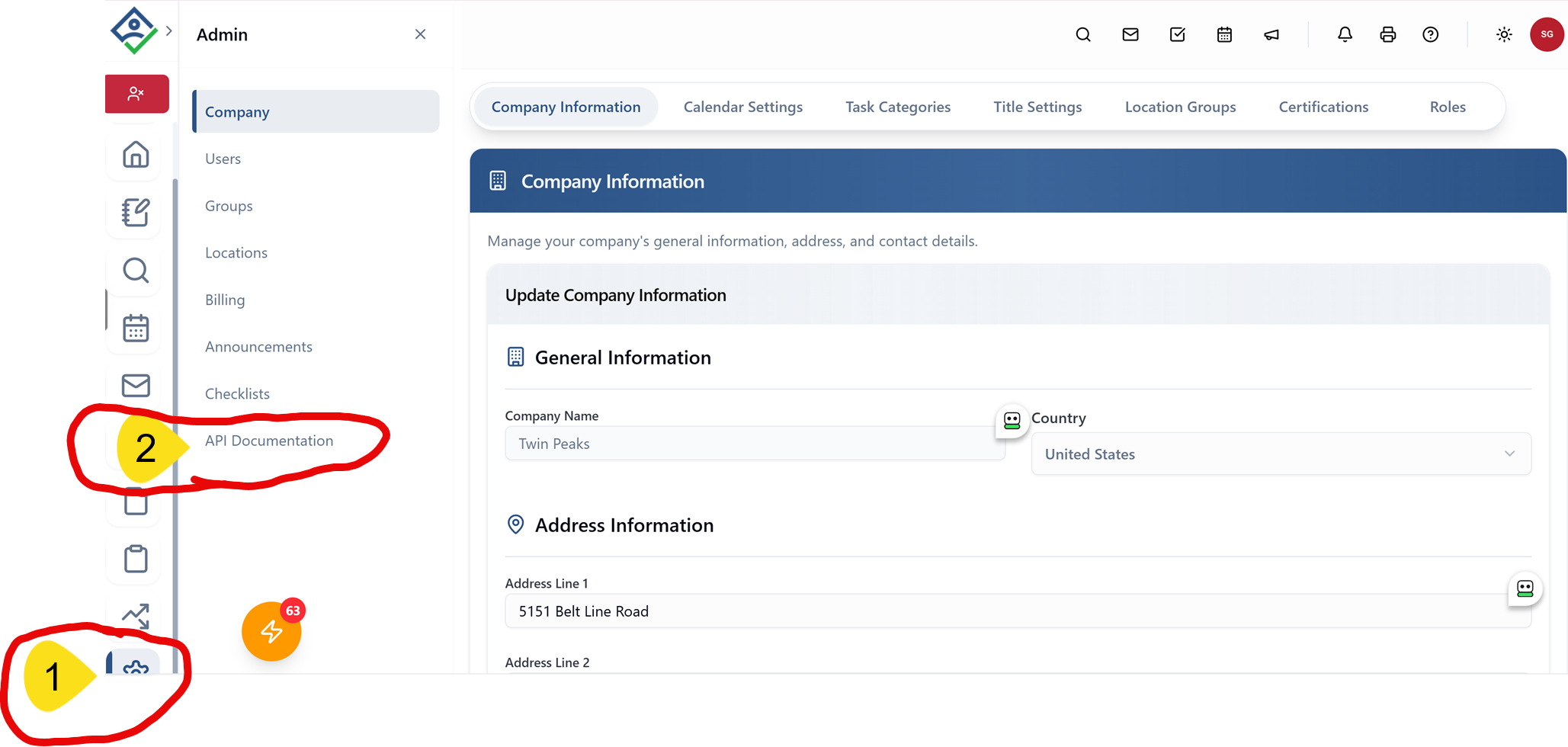
API access must be turned on for your company by ShiftForce before a key exists. Once it is on, you will see an API Key section and an API Documentation page under Admin in ShiftForce.
- Company Admin (CA) permissions are required to view, copy, or reset the API key. Managers and standard users will not see it.
- The key is tied to one admin user. Every API call runs with that user's location access, so pick an admin who can see all of the locations you want to pull.
- Treat the key like a password. Store it in your integration's secret manager, not in a shared document or email thread.
- To request access, or to change which admin the key is tied to, contact ShiftForce support by email or live chat.
Quick start for admins: find, copy, or reset your key
You do not need to contact support to see or replace your key. Everything is in the app.
- Log in to ShiftForce as a Company Admin.
- Click the gear icon at the bottom of the left sidebar to open Admin, then choose Company. Scroll to the API Key section near the bottom of the page.
- Click Show Key to reveal it, then Copy to put it on your clipboard. Paste it straight into your integration's configuration.
- If the key is ever lost or exposed, click Reset Key and confirm. A new key is generated immediately; the old key stops working the moment you confirm.
- Copy the new key and update your integration. Usage history carries over to the new key, so your logs and limits are unaffected.
[Screenshot: Admin > Company, API Key section with Show Key, Copy, and Reset Key]
Resetting the key breaks any integration still using the old one, so coordinate with your developer before you reset.
Authentication and rate limits
Every request must include your API key. All endpoints are read-only (GET); there is no way to create or change data through this API.
|
Limit |
Default |
What happens if you exceed it |
|---|---|---|
|
Calls per minute |
60 |
Requests return 429 with a |
|
Calls per 24 hours |
5,000 |
Requests return 429 with a |
|
Date range per call |
31 days maximum |
Requests outside the window are rejected; split the range into monthly calls |
A call is one request to one endpoint, regardless of how much data comes back. Pulling 12 months of daily logs for one location is 12 calls; for 100 locations it is 1,200 calls, which fits comfortably inside one day's allowance if you spread it out.
For ongoing syncs, pull once a day per location rather than polling. Pull the locations list once and cache it; location IDs do not change.
Send the key in a request header; either form works:
X-Api-Key: <your key>or
Authorization: ApiKey <your key>Example:
curl -H "X-Api-Key: <your key>" [production base URL]/integrations/locationsBase URL: [production API base URL — confirm with Justin; staging is apimobilestaging.shiftnote.com]
Endpoint reference
Four endpoints are available. Start with Locations to get the locationId values the other three require.
|
Endpoint |
Returns |
Parameters |
Typical use |
|---|---|---|---|
|
Locations |
Every location the key's admin can see: |
none |
Call once, cache the IDs |
|
Daily Log |
|
|
Narrative shift notes for AI summarization or search |
|
Stats |
|
|
Numbers for BI dashboards and trend reporting |
|
Daily Summary |
|
|
One call per location returns its days, stats and notes together |
Exact paths, field names, and example JSON responses for each endpoint are shown in Admin > API Documentation inside ShiftForce; the bracketed paths above should be replaced with those before publishing.
A typical first pull: call Locations, then loop through each locationId calling Daily Summary one month at a time until you have the history you need. After that, a single Daily Summary call per location per day keeps you current.
Response status codes
|
Code |
Meaning |
What to do |
|---|---|---|
|
200 OK |
Request succeeded; data is in the body |
Nothing |
|
401 Unauthorized |
Key missing, malformed, or revoked |
Check the key in Admin > Company; if it was reset, update your integration |
|
403 Forbidden |
Key is valid but cannot access that location or endpoint |
Confirm the |
|
429 Too Many Requests |
Rate limit hit (60/minute or 5,000/day) |
Wait the number of seconds in the |
|
4xx Validation error |
Date range over 31 days or a bad parameter; body is a standard |
Read |
Build retry logic that honors `Retry-After` on a 429 rather than retrying immediately, so a burst does not consume the rest of the day's allowance.
Usage log and key history
ShiftForce keeps a full record of your API activity, tied to your company rather than to any one key, so history survives a reset.
- Calls in the last 60 minutes and last 24 hours, so you can see how close you are to the limits
- Every call with its endpoint and how long it took to respond
- Every key reset and revocation, with timestamps
If you want to review this log for your account, contact ShiftForce support by email or live chat and we will walk through it with you.
Built-in API documentation
For exact request paths, field-by-field response schemas, and live examples, log in to ShiftForce as a Company Admin and go to Admin > API Documentation. It lists the four endpoints your key can access, shows a sample response for each, and documents the 200, 401, 403, and 429 responses, so most questions can be answered there without opening a ticket.
Need help?
If you need API access turned on, want the key tied to a different admin, or hit something the in-app documentation does not cover, reach ShiftForce support by email or through live chat on our help page. Include your company name and the endpoint and status code you are seeing, and we will get you moving.